The whole history in Odoo accounting reports, in one click
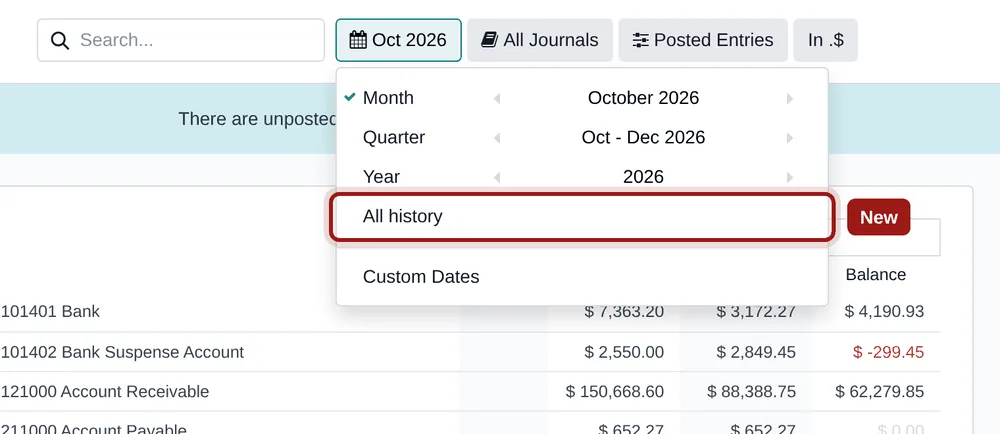
The date filter of the accounting reports offers month, quarter, year and custom dates. To see an account since day one, you have to guess the date of the first entry and type two dates. This free module adds the missing entry: “All history”.
Two dates to type, every time
Auditing an account, finding an old balance, answering the accountant: you need the whole history.
Guessing the first entry
When was the first entry of this account? You need to know to type it.
Dates to type again
For every report and every account, the same two dates to type by hand.
A forgotten entry
A back-dated entry, older than the date typed, drops out of the report unnoticed.
What All History does
One more entry in the date filter.
One click
A new entry in the date filter of every period report, right after “Year”.
Always complete
The range runs from the first to the last journal item and is recomputed on every reload: a back-dated entry is never left out.
No footprint
No model, no setting, no data written. Uninstalled, the reports are exactly as before.
No setting
-
Open a report
Accounting › Reporting: general ledger, trial balance, profit and loss, partner ledger…
-
Pick “All history”
In the date filter, between “Year” and “Custom Dates”.
-
Read the full picture
The report covers every journal item; the other filters (journals, posted entries, comparison) work as usual.
Frequently asked questions
Our other Odoo modules
Are your Odoo accounting reports missing something?
Tell us what you are trying to read: we tell you how to get it.