The sales line description, all the way to the delivery slip
A dimension, a colour, a finish: on a quotation, the useful information often lives in the line description. Odoo does not pass it on to the delivery. Delivery Line Description carries it to the transfer and the delivery slip.
The warehouse only sees a generic product
The stock move only gets the product name and its variants.
Two identical lines
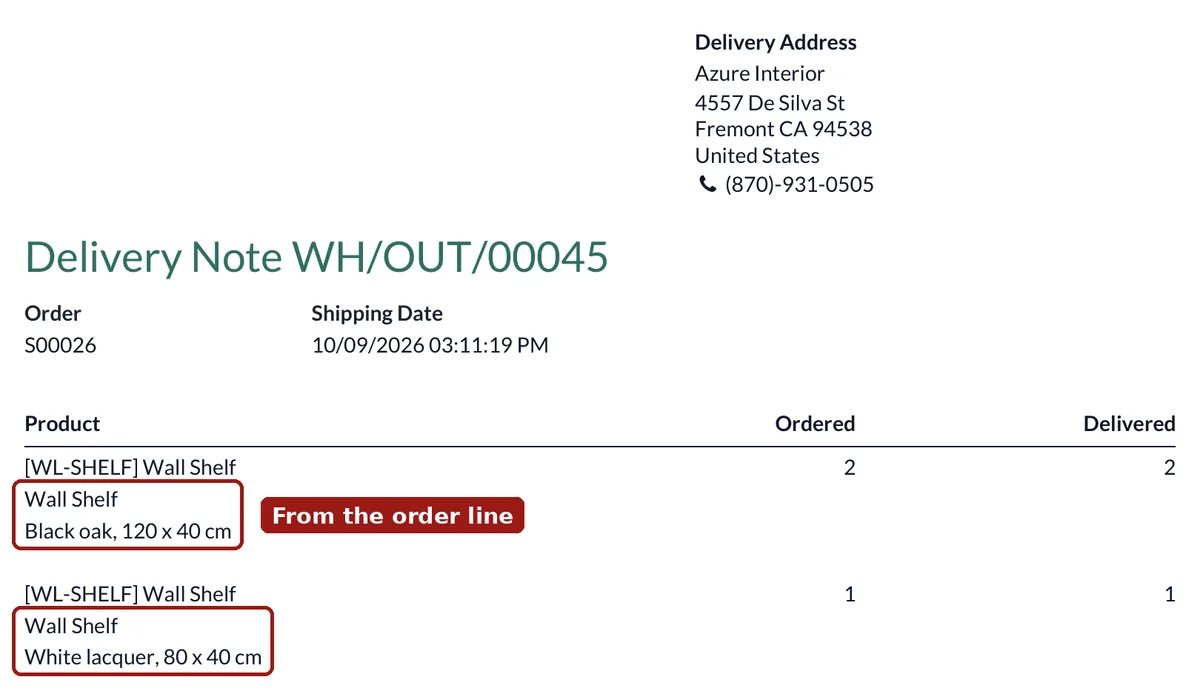
Sell the same product twice with two descriptions: the transfer shows two identical lines. Which one is which?
The customer sees nothing of it
The delivery slip sent to the customer does not repeat what was on the quotation.
Back and forth
The picker has to reopen the order to know what to prepare.
What Delivery Line Description does
The sales line text follows the goods.
On the move
Each stock move gets the description of its own sales line: the transfer and the delivery slip show it under the product.
Always up to date
Change the description on the order and the transfer follows. A description typed by hand on the transfer is kept.
Product notes kept
The product delivery note (Inventory tab), if you use it, is printed under the line description.
Nothing to configure
-
Describe the line on the order
Type the details in the line description, as you already do for the quotation.
-
Confirm the order
The delivery is created as usual.
-
Print the delivery slip
Each line shows the product and, below it, the description of its sales line.
Frequently asked questions
Your delivery documents do not tell everything?
Send us a delivery slip and what it should contain.