Block the bots slowing down your Odoo
Price scrapers, booking bots and AI crawlers load your public pages thousands of times a day. Anti-Bot Rate Limiter stops them at Odoo’s door, before the session and the page rendering. It also works on Odoo.sh, where you have neither nginx nor a firewall.
A problem the Odoo interface never shows
A bot creates no user, no record and no error. You only see its effects.
A slow website for no clear reason
Public pages slow down in quiet hours as well as busy ones, although nothing was changed.
Killed workers, late scheduled actions
The server saturates in waves: Odoo.sh restarts workers, scheduled actions wait their turn.
A bigger Odoo.sh plan… for nothing
Adding capacity fixes nothing: the bot takes it too. The problem is volume, not power.
Up to 77% of the server for a single bot
On a production Odoo.sh database we maintain: 175,000 requests a day on the appointment booking pages, from some sixty addresses in the same range, without reverse DNS. After blocking, over two comparable days (same weekday):
The response time of a page for a human visitor did not go down: the gain is in freed capacity and the end of saturation. Read the full case.
What Anti-Bot Rate Limiter does
A protection built for Odoo: it knows its URLs, its workers and its logged-in users.
Rules per URL
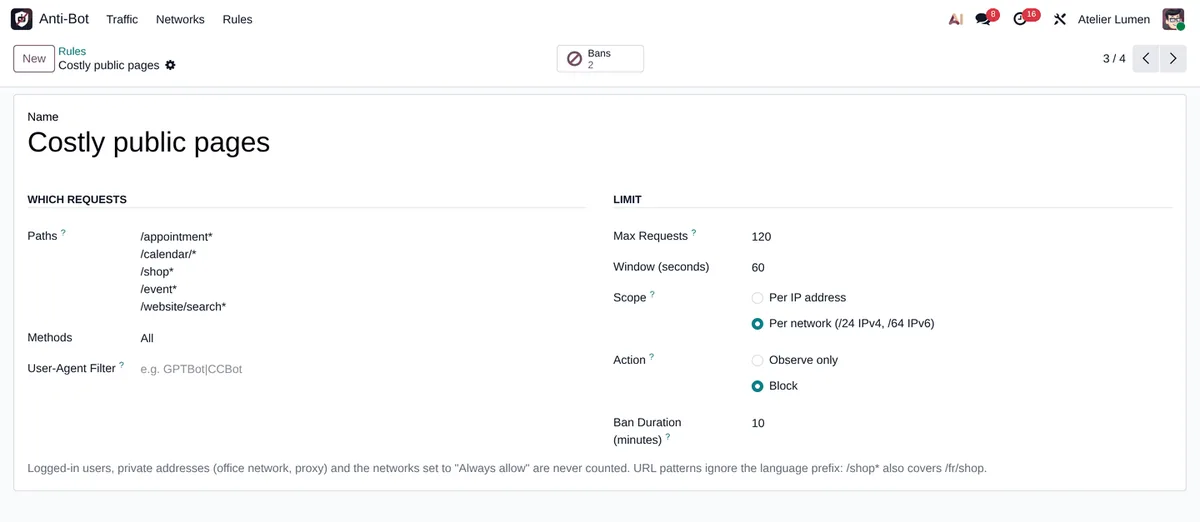
URL patterns (/appointment*, /shop*), HTTP method and User-Agent, with a limit over a sliding window. The language prefix is ignored.
Per address or per network
Counting per IP or per network (/24 in IPv4, /64 in IPv6): a bot rotating over a whole range is seen as one.
Observe, then block
Observe mode counts what would be refused without refusing anything. Block mode answers “429 Too Many Requests”, then bans the network for a while.
Allow and block lists
Your offices and partners always allowed, a range blocked for good, automatic bans lifted in one click.
Traffic report
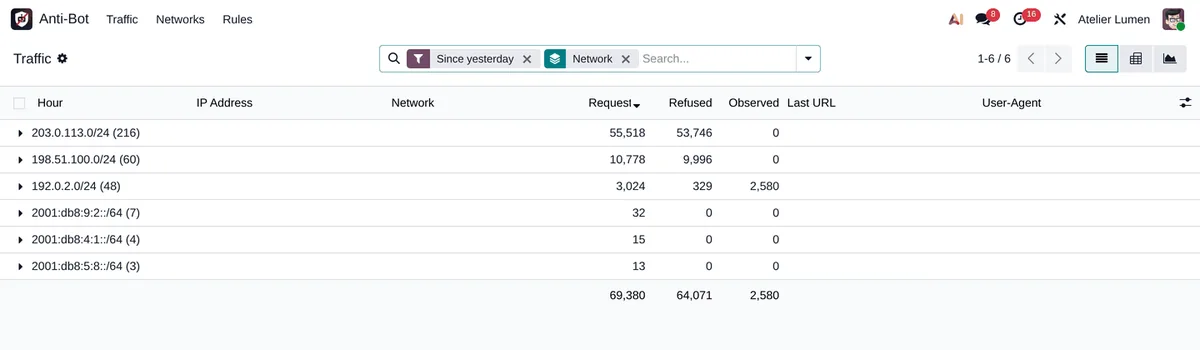
Requests per address and per hour, in list, pivot and graph views. Block a network from the report in one click.
No SQL query per visit
Each worker counts in memory and shares its counters every 5 seconds, in a single batch. A refusal costs a few milliseconds.
Installed in five minutes, without blocking anyone by mistake
-
Install the module
Four rules are created in Observe mode: whole site, login, costly public pages, AI and SEO crawlers. Installing refuses nothing.
-
Read the traffic
After a day, the report shows who loads your server: network, URL, User-Agent, requests, and what would have been refused.
-
Switch to Block
Switch only the rules the figures convinced you of. Changes apply within 5 seconds, without a restart.
-
Tune the lists
Allow your offices and integrations, block known ranges, lift a ban when needed.
Frequently asked questions
--proxy-mode.Your Odoo is slow and you do not know why?
Let us look at your server logs together. 30 minutes, no commitment.