How old is your stock? The aging report is back in Odoo 19 and 20
Up to Odoo 18, the valuation layers kept the remaining quantity of each receipt: grouped by date, they gave the age of the stock. Odoo 19 removed these layers with nothing in their place, and so did Odoo 20. Inventory Aging Brackets rebuilds the report from the stock moves: quantity and value by age bracket, at the date of your choice. Free, for Odoo 19 and 20, Community and Enterprise.
No view of stock age any more
Sleeping stock costs space and cash, and Odoo 19 no longer shows it.
The layers are gone
Odoo 19 removed the valuation layers, and with them the remaining quantity per receipt that served as an aging report.
Wrong quant dates
Grouping quants by incoming date does not work: a new receipt merges with the quant already there, and one date ends up covering units received months apart.
No value per bracket
There is no way to tell what the stock older than 180 days is worth, or in which category it sleeps.
What Inventory Aging Brackets does
Each unit on hand is traced back to the entry that brought it in, oldest units out first.
Real ages
The stock on hand is split between the entries that brought it in (receipt, manufacturing, inventory, customer return). Two receipts merged into one quant keep their two ages.
Your brackets, your scope
Any reference date, a warehouse or a location, product categories, and your own brackets: 0-30, 31-60, 61-90, 91-180, 181-365 and over 365 days by default.
Quantity and value
FIFO products keep the cost of each receipt. Average and standard cost products are valued at the product cost, like the stock valuation.
List, pivot, graph
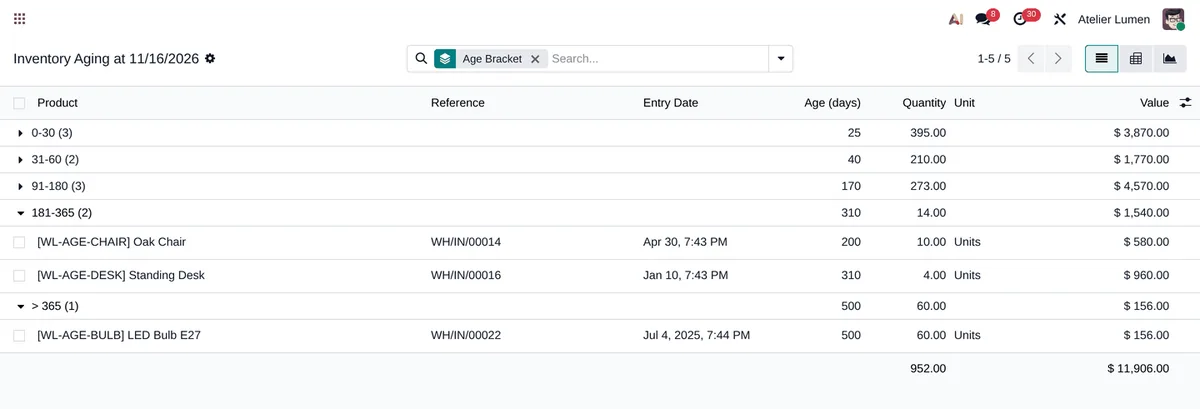
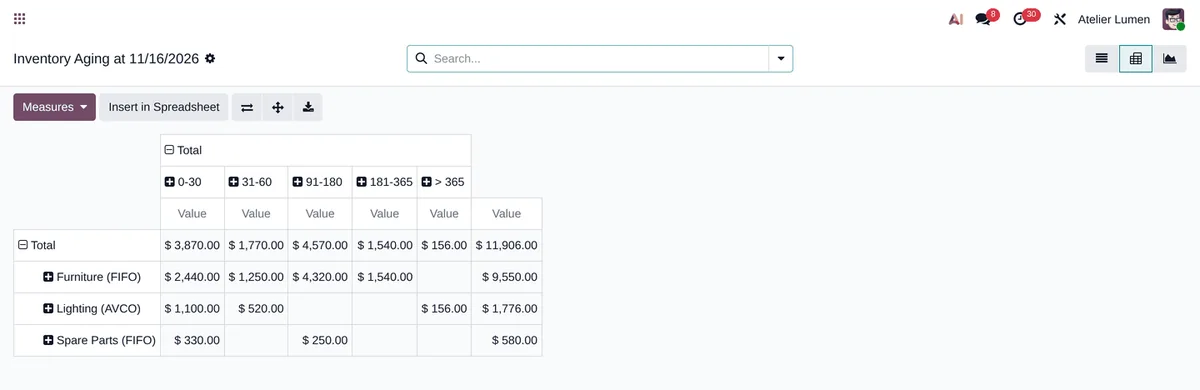
A list grouped by bracket, a categories × brackets pivot you can expand to products, a graph, and export to a spreadsheet.
Fast on a large catalogue
One pass for all products: about thirty queries, whether you have 20 or 2,000 products.
Other people’s stock left out
Consigned stock, owned by a third party, is left out, as in the stock valuation.
Three clicks
-
Open the report
Inventory › Reporting › Inventory Aging: reference date (today by default), warehouse or location, categories and brackets.
-
Read the stock by bracket
The list groups the stock by age bracket. Filters show what is older than 90, 180 or 365 days.
-
Analyse and export
The pivot crosses categories and brackets, down to the product. List and pivot export to a spreadsheet.
Frequently asked questions
Our other Odoo modules
Is your stock sleeping more than you think?
Tell me how you tracked stock age before Odoo 19: I show you what your stock looks like, bracket by bracket.