How much will you invoice next month, and on which project?
When a fixed-price project is invoiced on milestones, each milestone holds a share of the sales order line and a deadline, but no amount. Odoo has no report of what is left to invoice, project by project and month by month. Milestone Forecast gives every milestone its expected amount and invoicing status, in a ready-to-read report. Free, for Odoo 19 and 20, Community and Enterprise.
Milestones without an amount
“What do we bill in March?” is answered in a spreadsheet today.
No amount on the milestone
A milestone knows its share as a percentage and its deadline, not what it brings in.
No monthly view
To forecast invoicing, you open every project and multiply shares by order lines by hand.
Delays go unnoticed
A milestone reached but not invoiced, or a missed deadline, shows up nowhere.
What Milestone Forecast does
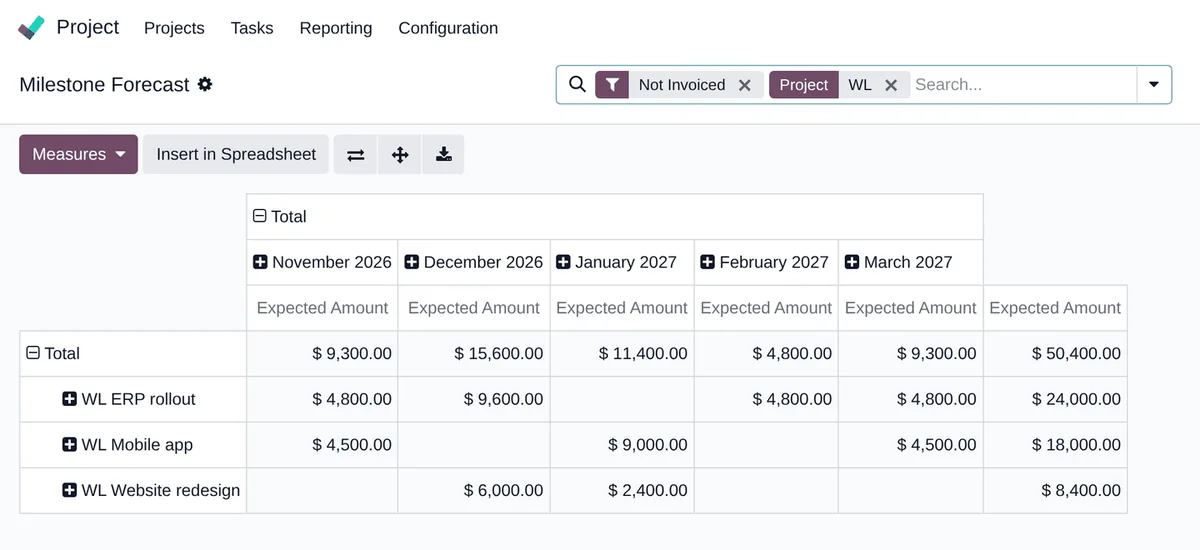
An amount, a status and a report on every milestone linked to a sales order line.
An amount per milestone
Share of the milestone × untaxed subtotal of its line, discount included, in the order currency, then converted to the company currency at the rate of the order.
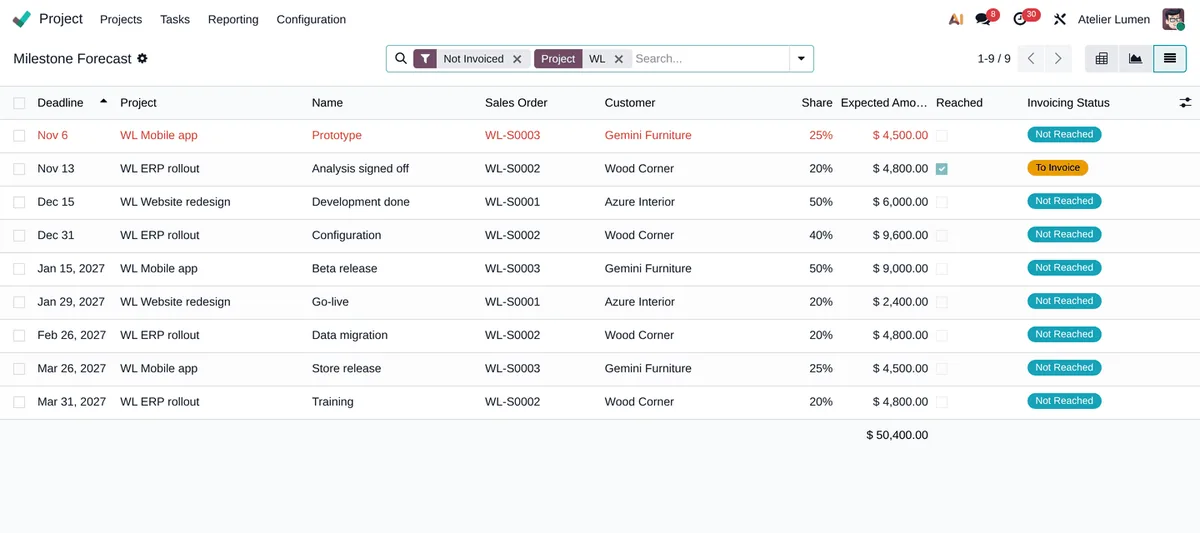
Not Reached, To Invoice, Invoiced
The quantity invoiced on the line is allocated to its milestones, reached ones first. A credit note or a cancelled invoice brings the status back.
Pivot, graph, list
Projects in rows, months of deadline in columns; a bar chart by status; a list where late milestones are in red.
The right filters
Not Invoiced, To Invoice, Late; group by customer or sales order, and export to a spreadsheet.
Salespeople only
Milestones are readable by every employee and by the portal: the added amounts and statuses only by the Sales group, and the menu is hidden from others.
Light on a large database
Amounts are stored and recomputed only when a line, a share or an invoice changes, in a fixed number of queries; the pivot is one grouped query.
Nothing to change
-
Plan milestones as usual
Sell a service invoiced on milestones, link the project milestones to the sales order line, give each one a share and a deadline.
-
Open the report
Project › Reporting › Milestone Forecast: the report opens on what is not invoiced yet.
-
Prepare the monthly invoicing
Filter on To Invoice before the invoicing run, group by customer or sales order, export.
Frequently asked questions
Our other Odoo modules
Do you prepare your invoicing in a spreadsheet?
Show me how you track your milestones today: I tell you what Odoo can compute for you.