Sort lines by column again, section by section
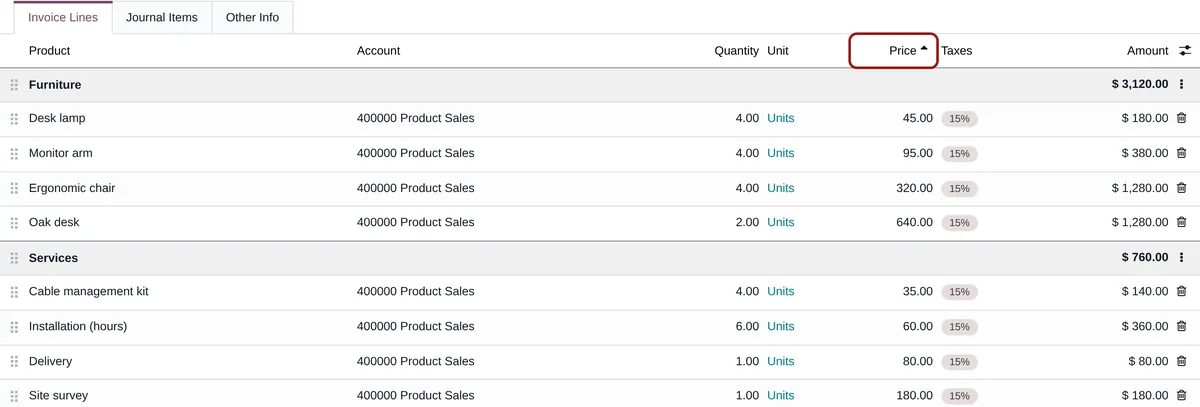
Up to Odoo 18, a click on the Unit Price or Product header sorted the lines of an invoice, a quotation or a purchase order. Since Odoo 19, those headers no longer react. Sort Lines in Sections brings sorting back, inside each section: sections, subsections and subtotals stay where they are. Free, for Odoo 19 and 20.
Column headers that no longer respond
Odoo 19 added subsections and section subtotals, computed from the position of the lines. A global sort would have mixed them up, so Odoo switched it off.
Dragging lines one by one
Putting the most expensive items first or grouping the lines of a quotation by product is done with the mouse, line after line.
Checking a long vendor bill
Without sorting by product or amount, finding one line among fifty means reading them all.
A global sort would be worse
Sorting the whole list would move lines from one section to another and break the subtotals.
What Sort Lines in Sections does
The click on the header, as before, without breaking the sections.
Sorted inside each section
A click on a header sorts the lines of each section, and of each subsection, on their own. Sections never move, so their subtotals stay right.
Click again to reverse
The arrow in the header shows the direction. Empty values always go last.
Notes and combos in place
Notes stay at the head of their section, combo items under their combo line.
Kept on save
The new order is the real order of the lines: saved with the document, in a single write, and printed on the PDF, as after a drag and drop.
Nothing on a locked document
A posted invoice or a locked order keeps its order: its headers are not sortable.
A natural sort
“Item 2” comes before “Item 10”, case and accent insensitive. Product, account or unit columns are sorted on the displayed name.
No settings
-
Open a document
Invoice, credit note, vendor bill, quotation, purchase order: any line list with sections. Lines not saved yet are sorted too.
-
Click a header
Product, description, quantity, unit price, subtotal: the lines are sorted inside each section; click again for the reverse order.
-
Save
The lines keep their new order, on screen and on the printed document. Nothing is written before you save; Discard brings the previous order back.
Frequently asked questions
account).Our other Odoo modules
Another habit lost with Odoo 19?
Tell me which gesture no longer works: I tell you whether a setting or a module brings it back.