The canned response description is back in Odoo 19 and 20
Up to Odoo 18, a canned response had three fields: the shortcut, the inserted text and a Description, where the team wrote down when to use it. Odoo 19 removed the field, the upgrade does not carry its content over, and Odoo 20 did not restore it. Canned Response Description puts it back, under the same name, and shows it where the response is chosen: in the composer suggestions. Free, for Odoo 19 and 20, Community and Enterprise.
Thirty responses, no instructions
Since Odoo 19, only the shortcut helps you pick the right response.
The context is gone
“Only once the refund is approved”, “B2B customers only”: these instructions lived in the description, which Odoo 19 no longer shows.
Odoo 18 data lost
The upgrade to Odoo 19 does not carry the field content over: years of instructions disappear from the screen.
The wrong response goes out
Two refund responses, two delay responses: without a description, nothing keeps the wrong one from reaching the customer.
What Canned Response Description does
The Odoo 18 field, back in place, and shown where it helps most.
Wherever responses are managed
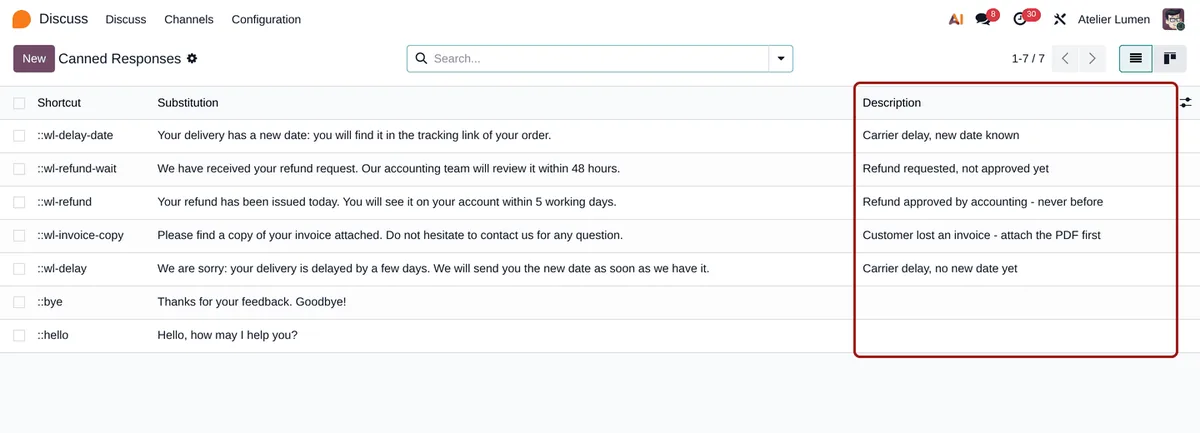
List (editable inline), form and kanban views of canned responses, in Discuss and in the Helpdesk menu.
In the :: suggestions
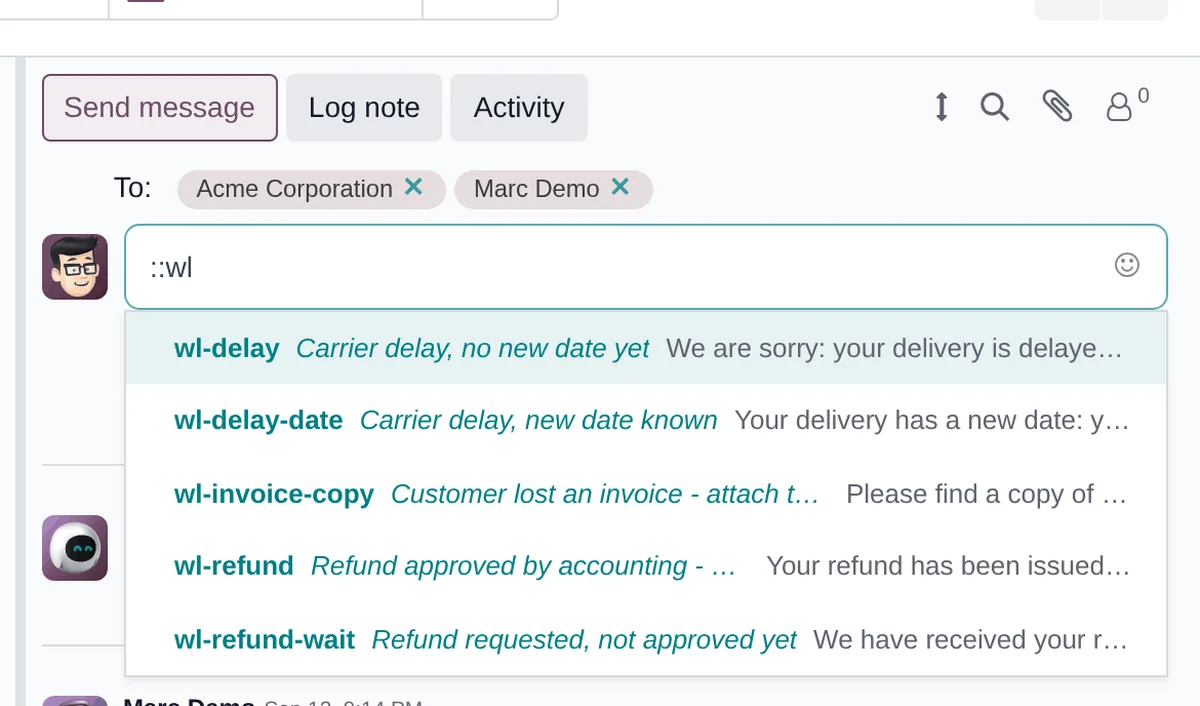
Type :: in a message: each suggestion shows its description between the shortcut and the text, in the chatter, Discuss, Live Chat and Helpdesk. Odoo 18 did not do that.
Searchable
A few words of the description in the search bar find the response.
Your Odoo 18 data comes back
Same technical name and type as Odoo 18: if the upgraded database kept the old column, the descriptions reappear as they were, with no script.
No extra query
The description is read in the same query as the shortcut and the text: one query, whether you have 2 or 200 responses.
Standard rights
Whoever can edit the response can edit its description: the standard canned response rules apply to the field.
No settings
-
Describe your responses
Discuss › Configuration › Canned Responses: the Description column follows the substitution. Write down when each response should be used.
-
Pick while writing
In any message, type :: and the start of a shortcut: each suggestion shows its description.
-
Find a response
In the list, type a few words of the description in the search bar.
Frequently asked questions
Our other Odoo modules
Did other fields disappear with Odoo 19?
Tell me what your teams can no longer find: I check in the code what the upgrade removed.