Review your payment reminders before Odoo 20 sends them
Up to Odoo 19, each reminder level had an “Automatic” checkbox: a level without it waited for someone to read the text and send it. Odoo 20 removed that checkbox: once automatic invoice reminders are on, every level goes out with the daily job, with nobody reading it first. Review Reminders brings that check back, level by level. Free, for Odoo 20 Enterprise.
The formal notice goes out the day after the phone agreement
The last, firmest level was often kept manual. In Odoo 20, a reminder level can no longer be manual.
Everything goes out daily
As soon as automatic invoice reminders are on, the daily job sends every level, the last one included.
A preview you cannot edit
The “Send Reminder” button of an invoice shows a read-only preview: no way to adjust the subject or the message.
The only brake blocks everything
To hold a reminder back, you have to switch the customer to manual reminders, which takes it out of every automatic level.
What Review Reminders does
One checkbox on the reminder level, a list and a review window.
One checkbox per level
“Review before sending” on the reminder level: usually the last one, or all of them for key accounts. Levels without it keep the standard automatic sending.
A list, not a surprise
The daily job puts the customers due at a reviewed level in Customers › Reminders to Review, with the level and the overdue amount. Nothing leaves before someone clicks Send.
Editable subject and message
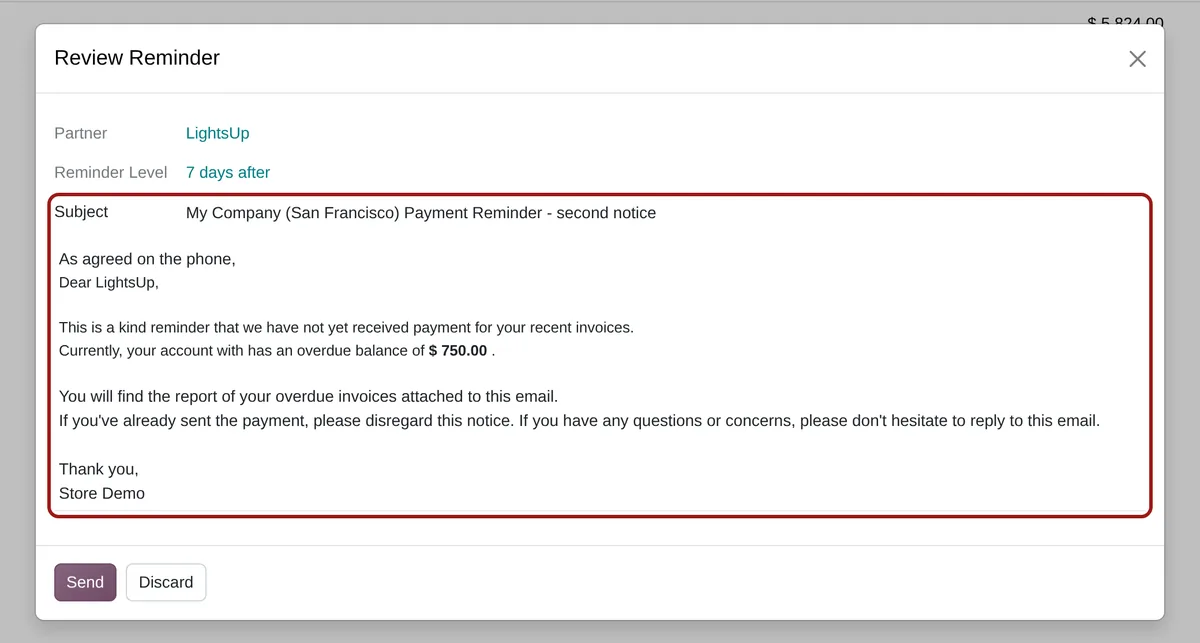
The review window shows the subject and the message the level would have sent. Change what you want, then send.
The standard sending
Attachments, activity, move to the next level: everything happens as with an automatic reminder. Only the subject and the message come from the review.
No reminder for a paid invoice
On Send, Odoo reads the customer’s situation again: if nothing is owed any more, or if the level changed in the meantime, the sending is refused.
Batch processing included
“Process Automatic Reminders” on selected customers follows the same rule: levels to review go to the list, the others are sent.
One checkbox, then a list to work through
-
Tick “Review before sending”
In the invoice reminders configuration, open a level and tick the option, next to Email and SMS.
-
Open the reminders to review
Customers › Reminders to Review lists the customers held back by the daily job. The same filter exists in the customer search, and the customer form shows a Review and Send Reminder button.
-
Edit and send
The subject and the message are those of the level. Change what you need and click Send: the customer leaves the list and moves to the next level.
Frequently asked questions
account_followup). In Odoo 18 and 19, a level that is not “Automatic” already waits for a manual, editable sending: the module is not needed there.Our other Odoo modules
Worried about moving to Odoo 20?
Tell me what your teams do by hand today: I check in the code what Odoo 20 kept of it.