The Valuation button is back on Odoo transfers
Up to Odoo 18, a validated receipt or delivery had a Valuation button, in developer mode: one click and you saw what the transfer was worth, line by line. Odoo 19 rebuilt stock valuation on the stock moves themselves, and the button did not survive. Stock Valuation Button brings it back, for every user concerned, with Odoo’s standard valuation list. Free, for Odoo 19 and 20.
What was this receipt worth?
The value still exists in Odoo 19 and 20, but it is no longer one click away from the transfer.
No more button on the transfer
A validated receipt no longer shows its value: you go through Inventory reporting and filter the moves by reference.
A list designed for one product
The standard valuation list opens from the total value of a product: it does not show the product and, outside FIFO, hides the move value.
The same detour for every document
Receipt, delivery, return, manufacturing order: every value check goes through the same filter, typed again.
What Stock Valuation Button does
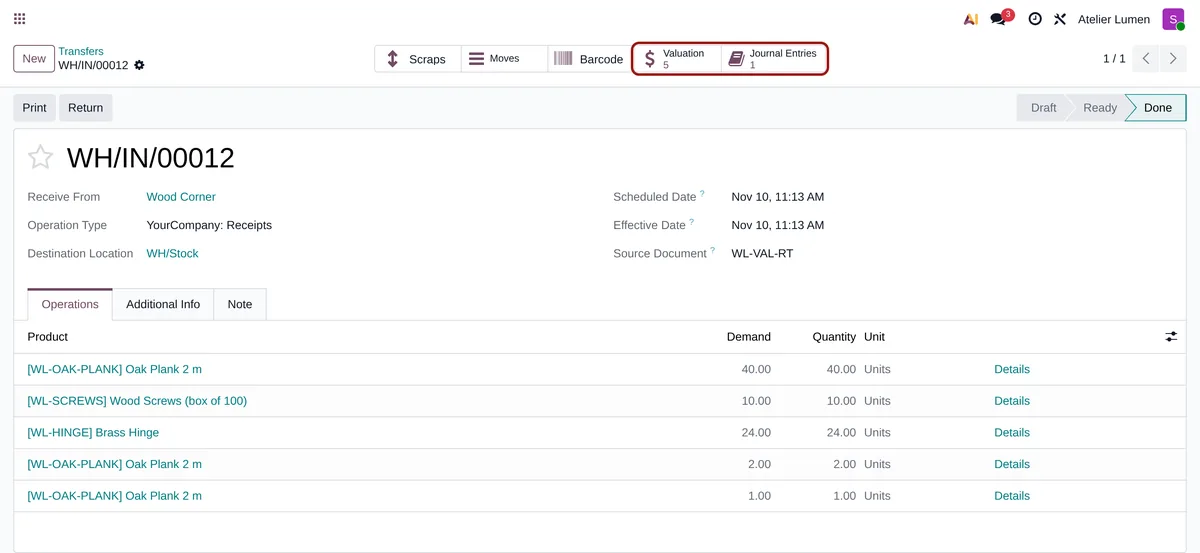
Two smart buttons on the validated transfer, and the same on the manufacturing order.
The transfer, valued
A Valuation button with the number of valued moves opens them in the standard valuation list: product, locations, value and value description. FIFO and average cost alike.
Scraps and landed costs
Scraps made from the transfer are included, as in Odoo 18. The value shown includes the landed costs validated on the receipt.
Journal entries too
When the moves posted entries (automated valuation on a location with a valuation account, such as scraps), a Journal Entries button opens them.
Manufacturing orders
With Manufacturing, the companion module MO Valuation Button installs itself: consumed components, finished products, by-products and scraps, with their value.
One query per form
Both counters come from a single query, whatever the number of moves.
Read only
The module reads the value computed by Odoo and writes nothing: your stock valuation does not change.
No settings
-
Validate a transfer
Receipt, delivery, return: any transfer that moves products into or out of your valued stock.
-
Click “Valuation”
The button shows in the top right corner of the validated transfer, with the number of valued moves.
-
Read the value of each move
Product, source and destination, quantity, value and how it was computed. The entries open from the second button.
Frequently asked questions
stock_account. In Odoo 18, the standard button still exists, in developer mode.Our other Odoo modules
Lost track of your stock valuation since Odoo 19?
Show me a receipt and what you expected to read on it: I tell you where Odoo now keeps that information.